Contact Us





Purchase Requests
Connect inventory requirements with structured purchasing requests and approval workflows.
Explore Purchase Requests → ×
×

ZYNO Procurement · Inventory Management
Know what you have, where it is, what is moving, what you may need next, and when it is time to reorder.
ZYNO Inventory Management Software connects real-time inventory tracking, stock control, multi-warehouse management, inventory forecasting, automated replenishment, inventory traceability, analytics and procurement workflows in one connected platform.
Whether you manage multiple warehouses, large SKU volumes, retail operations or enterprise inventory workflows, ZYNO helps your teams move from reactive stock checking to more informed inventory control and replenishment.
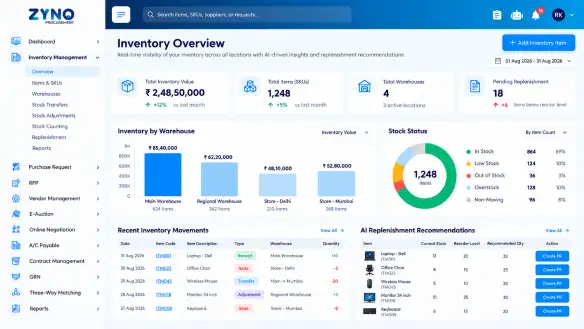










Inventory management software is a digital system that helps businesses monitor stock levels, inventory locations, stock movements, replenishment requirements and related operational information.
Instead of relying on disconnected spreadsheets and manual stock checks, an inventory management system gives teams a shared view of inventory so they can make purchasing, warehouse, finance and planning decisions using more current information.
For businesses managing multiple warehouses, suppliers and SKUs, effective inventory management goes beyond knowing how much stock is available.
The right inventory and stock management software should help teams answer five practical questions:
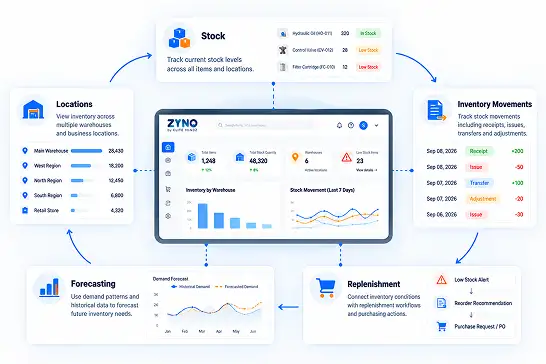
Know current inventory stock levels and available quantities across your locations.
Understand stock locations across warehouses and other business locations in real-time.
Track inventory movements and stock changes across relevant inventory management workflows.
Use demand forecasting and inventory patterns to plan future stock requirements.
Connect inventory conditions with replenishment workflows and purchasing decisions when required.
Inventory problems rarely stay inside the warehouse.
When stock information is incomplete or delayed, procurement may reorder too late, teams may struggle to locate available stock, finance may work with outdated inventory information, and fast-moving products can approach stockout levels while slower-moving inventory continues to occupy working capital.
A connected inventory stock management software system helps bring these activities together.
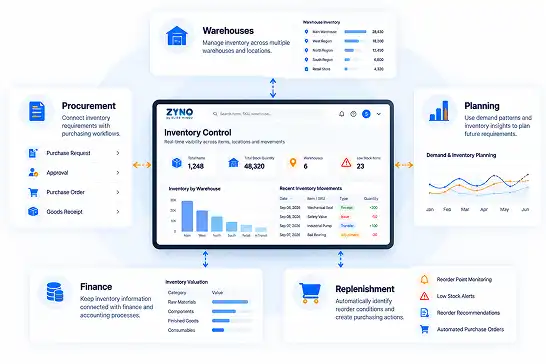
Maintain a current view of inventory across warehouses and locations so teams can work from shared stock information.
See inventory positions across locations and maintain visibility into stock transfers and relevant in-transit inventory.
Use demand patterns, seasonality and supplier lead-time information to support future inventory planning.
Connect inventory conditions with replenishment and purchasing workflows.
Use inventory and demand insights to identify slow-moving or excess stock that may require closer attention.
Connect inventory requirements with procurement workflows so replenishment can move naturally from need to purchase.
Effective inventory management starts with knowing what is available, where it is located, what is changing and what needs attention.
ZYNO combines core stock management software capabilities with inventory forecasting, replenishment, traceability, analytics and connected procurement.
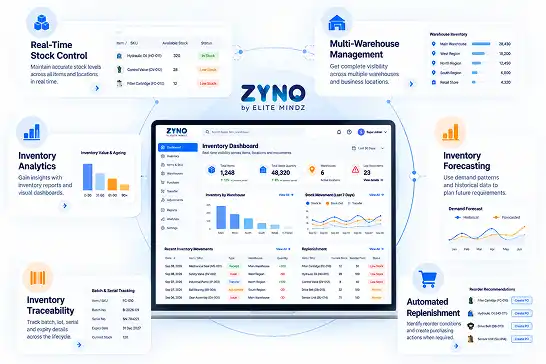
Track inventory levels and movements across relevant workflows to maintain a current view of stock availability and activity.
Manage inventory across multiple warehouses and locations through one connected environment.
Use demand signals, seasonality and supplier lead-time information to plan future inventory requirements.
Identify replenishment requirements and connect reorder decisions with purchasing workflows.
Track inventory through relevant barcode, RFID, batch and lot workflows where detailed traceability is required.
Understand inventory movement, ageing, replenishment requirements, slow-moving stock and other operational inventory information.
Inventory control starts with accurate item information.
When product and SKU information is scattered across spreadsheets and systems, even simple stock or purchasing decisions can become harder to manage.
ZYNO brings inventory information into a connected environment so teams can work with consistent information about the items they purchase, receive, store, move and replenish.
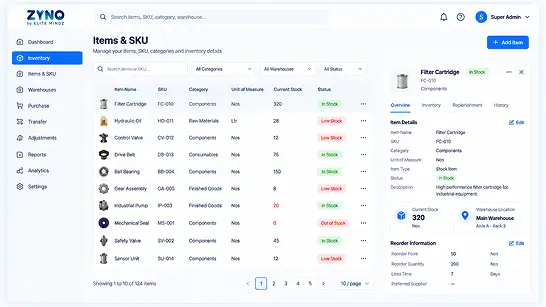
Maintain structured inventory-related item information in one connected environment.
Organize inventory information around relevant categories and attributes for easier management and reporting.
Manage relevant inventory quantities using supported units of measure across purchasing, receiving and stock processes.
Connect item records with inventory quantities, locations and movement information.
Use item-level inventory information to support reorder decisions and replenishment planning.
Once item information is structured, the next challenge is keeping inventory accurate as stock moves.
Inventory changes constantly through purchases, receipts, transfers, sales and adjustments.
The value of real-time inventory tracking comes from keeping those changes visible as operations happen.
ZYNO helps teams maintain a connected view of inventory activity so they can understand current stock positions and make decisions using more current information.
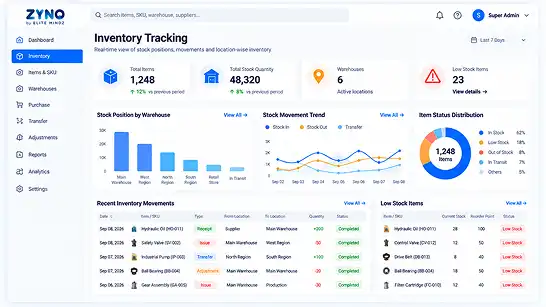
Follow inventory as stock enters, moves through and leaves relevant operational workflows.
Understand where inventory is available across warehouses and locations.
Use movement information to understand how inventory has changed over time.
Keep inventory information connected with operational activity to support consistent inventory control.
Give procurement, warehouse, finance and operations teams a common view of relevant inventory information.
As businesses grow, inventory rarely stays in one place.
Stock may be distributed across warehouses, move between locations or remain in transit.
ZYNO provides multi-warehouse inventory management so teams can understand inventory availability across locations and coordinate stock movement from one connected environment.
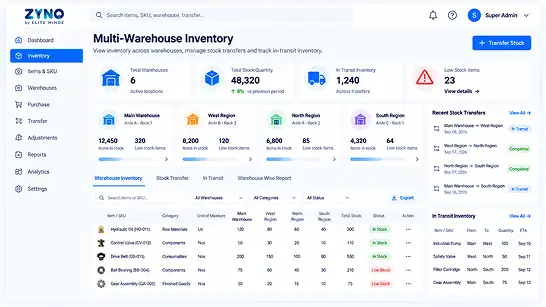
See inventory by warehouse or location without maintaining separate inventory records for every site.
Track inventory across supported warehouse locations and storage points for more precise stock visibility.
Track inventory moving between locations while maintaining visibility into transfer activity.
Understand inventory that is moving between relevant locations or operational stages.
Give procurement, warehouse, finance and operations teams a shared view of inventory.
Real-time tracking is important, but inventory accuracy also requires structured controls for physical verification.
When physical stock and recorded inventory do not match, teams need a clear way to investigate, adjust and reconcile the difference.
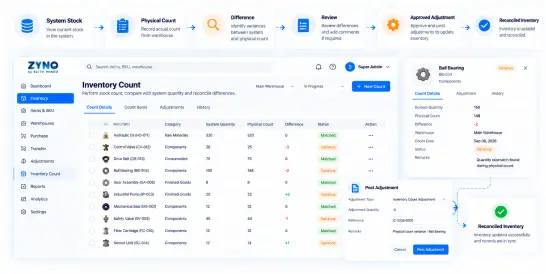
Compare physical inventory with recorded quantities through stock counts and cycle-counting workflows to identify discrepancies requiring review.
Review inventory records and activity to identify discrepancies across items, locations and transactions.
Record approved inventory changes when verified physical quantities differ from system records.
Review differences between operational records and inventory information to support better stock accuracy.
Maintain relevant inventory activity information so teams can understand how stock records have changed.
Maintain visibility into relevant inventory activity and approved changes through system records.
Inventory management is not simply a matter of watching a stock number.
Inventory changes through operational transactions, and those changes need to remain visible.
Together, these activities create the operational foundation of an effective inventory control system.
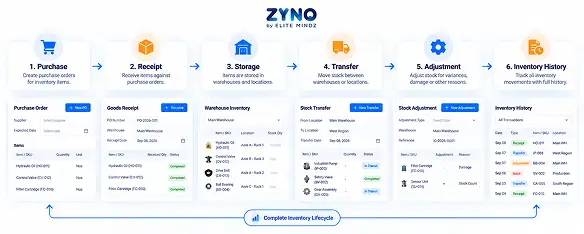
Record inventory as stock enters the business through purchasing and receiving workflows.
Move inventory between locations while maintaining visibility into stock movement.
Record approved changes when physical and recorded inventory differ.
Verify physical quantities against system records.
Understand how stock has changed through relevant inventory transactions.
Knowing how much inventory you have is sometimes not enough.
Businesses may also need to understand additional information associated with inventory as it moves through operational processes.
ZYNO supports inventory traceability through relevant tracking workflows.
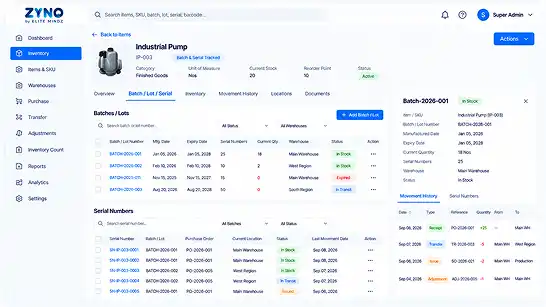
Maintain relevant batch, lot and expiry information to support inventory traceability and closer monitoring of time-sensitive stock.
Track individual inventory items using serial numbers to maintain item-level visibility and traceability across relevant inventory processes.
Support scan-based inventory workflows for faster and more consistent stock tracking.
Maintain visibility into relevant inventory activity and movement.
Connect inventory tracking information with receiving, movement and replenishment workflows.
Inventory is not only a quantity.
It also represents financial value, operational capacity and working capital.
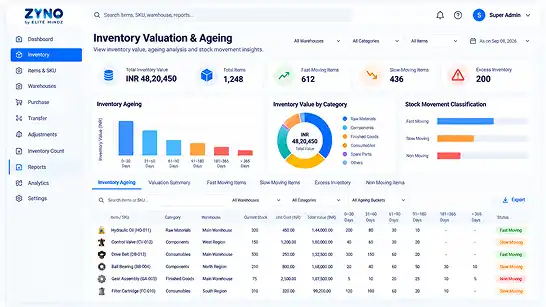
Understand the value associated with inventory and connect inventory information with relevant financial analysis.
Identify inventory that has remained in stock for extended periods and may require closer attention.
Identify products moving quickly and requiring consistent replenishment attention.
Identify products moving more slowly and evaluate their purchasing and inventory position.
Use inventory and demand insights to identify stock that may be tying up working capital.
Use inventory information to support purchasing, replenishment, operational and management decisions.
Knowing what you have today is only half of inventory management.
The next question is: What will you need tomorrow?
ZYNO connects inventory forecasting with demand signals, seasonality and supplier lead-time information to help teams plan future inventory requirements more proactively.
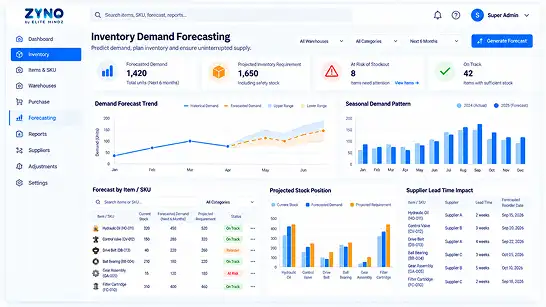
Analyze demand patterns at the SKU level to identify potential changes in inventory requirements.
Use historical demand information to identify patterns that may influence future inventory needs.
Account for changing demand patterns when preparing inventory requirements for upcoming periods.
Consider supplier lead times when planning replenishment and purchasing decisions.
Connect inventory forecasts with replenishment and purchasing workflows.
Traditional inventory management tells you what is happening with your stock.
AI-powered inventory management can go further by analyzing inventory and demand signals to help identify what may happen next and what action may be required.
ZYNO combines inventory data, demand patterns, seasonality, supplier lead times and replenishment information to support more informed inventory planning and purchasing decisions.
AI inventory software can combine inventory data, demand signals and replenishment information to support more informed stock decisions.
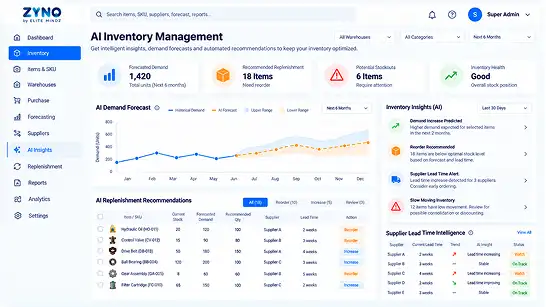
ZYNO provides AI-powered inventory management for businesses managing multiple locations, suppliers and SKUs. It combines inventory tracking, demand forecasting, replenishment intelligence, multi-warehouse visibility, inventory traceability and connected procurement workflows in one platform.
Analyze historical demand and seasonality to support future inventory planning.
Identify inventory approaching configured reorder conditions and determine where replenishment attention may be required.
Use supplier lead-time information to support more informed replenishment timing.
Identify unusual inventory movement that may require investigation.
Bring inventory information across locations into a connected environment for broader inventory planning.
Connect inventory requirements with purchasing workflows.
Retail inventory can change quickly because of demand fluctuations, seasonality, product velocity and multiple selling locations.
AI-powered inventory management can help retail teams move from simply monitoring current stock toward anticipating future inventory requirements and replenishment needs.
For larger organizations, inventory intelligence needs to work across locations, suppliers, SKUs and business workflows.
ZYNO connects AI-powered inventory capabilities with multi-warehouse visibility, forecasting, replenishment and procurement workflows to support more connected enterprise inventory planning.
AI inventory management combines inventory information with demand patterns, historical data, seasonality, supplier lead times and stock conditions to identify future inventory requirements.
ZYNO uses these signals to support demand forecasting, identify replenishment needs and connect inventory decisions with purchasing workflows.
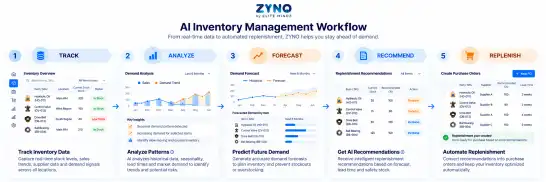
Collect relevant inventory and stock movement information.
Identify patterns in inventory activity and demand.
Estimate future inventory requirements using available demand signals.
Surface inventory and replenishment requirements that may need attention.
Connect inventory requirements with configured purchasing and procurement workflows.
This moves AI from simply analyzing information to supporting practical inventory and purchasing decisions.
See how ZYNO can streamline purchasing, vendor management, approvals, quotations, procure-to-pay and spend visibility in one connected procurement platform.
Forecasting becomes valuable when it leads to action.
ZYNO connects inventory conditions with automated inventory replenishment workflows so teams can identify items approaching configured reorder conditions and move faster toward purchasing.
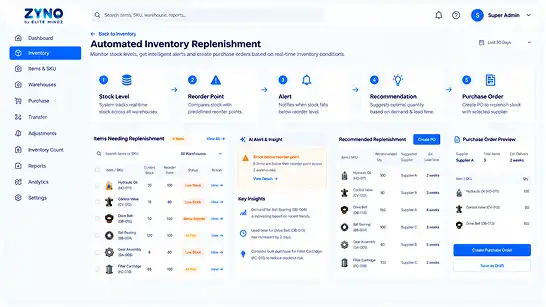
Use configured inventory thresholds to identify when stock may require replenishment.
Surface inventory conditions requiring attention before they become larger operational problems.
Use inventory and demand information to support decisions about what needs replenishment.
Connect replenishment requirements with purchase-order workflows when configured inventory conditions require purchasing action.
Use supplier lead-time information to support more timely replenishment decisions.
Move from reactive emergency purchasing toward planned replenishment based on inventory and demand signals.
Manual inventory entry can create unnecessary work and introduce avoidable errors.
Barcode inventory management and RFID-enabled workflows can make inventory activity easier to capture across receiving, picking, putaway and related operations.
ZYNO connects scan-based inventory activity with the wider inventory management process.
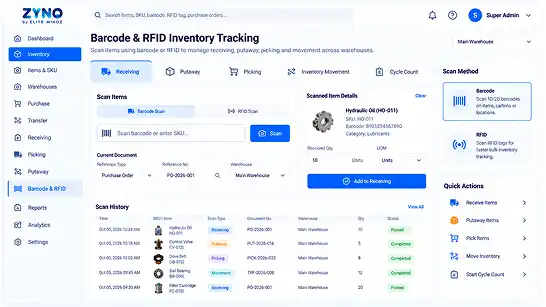
Support receiving, picking and putaway through relevant barcode and RFID-enabled workflows.
Reduce repetitive manual data entry during inventory operations.
Connect captured inventory activity with inventory records and movement history.
Maintain greater visibility into inventory activity through scan-based workflows.
Inventory reporting should do more than display quantities.
It should help teams understand:
Understand how inventory moves across locations and operational workflows.
Identify inventory that has remained in stock for longer periods.
Identify inventory moving more slowly and requiring purchasing attention.
Understand which items may require replenishment based on current conditions.
Give decision-makers a clearer view of inventory conditions across the business.
Inventory does not operate in isolation.
Purchasing creates stock requirements. Receiving changes inventory. Finance records financial transactions. Sales activity can affect availability.
ZYNO connects inventory information with relevant business workflows through its broader platform environment.
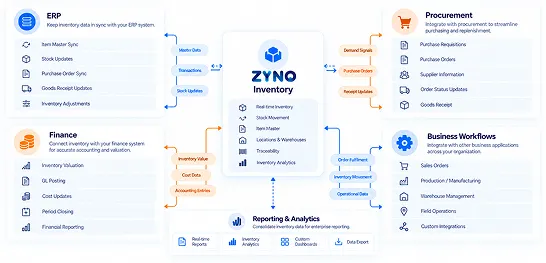
Make relevant inventory information available within connected finance processes.
Connect supported business workflows with inventory visibility.
Reduce the need for teams to maintain separate inventory information across disconnected systems.
Inventory management becomes more valuable when the system can act on inventory requirements.
When stock needs replenishment, the next step is procurement.
ZYNO connects inventory with its broader procurement environment so teams can move from inventory requirement to purchasing action without creating disconnected workflows.
From inventory requirement to payment
Capture inventory-driven purchasing requirements and route them through configured approval workflows.
Explore Purchase RequestsConnect purchasing requirements with supplier quotation workflows.
Explore Quotation ManagementConnect inventory purchasing requirements with supplier information and vendor workflows.
Explore Vendor ManagementConnect purchasing, receiving, invoice processing and payment workflows.
Explore Procure to PayConnect receiving information with purchasing and inventory updates.
Explore Goods ReceiptConnect invoice processing with purchasing and receiving information.
Explore Accounts PayableUse procurement and spending information to understand purchasing activity.
Explore Spend AnalyticsIndian businesses often need inventory management software that works alongside purchasing, finance, warehouses and multi-location operations.
ZYNO connects inventory with relevant business and procurement workflows to support more connected operations.
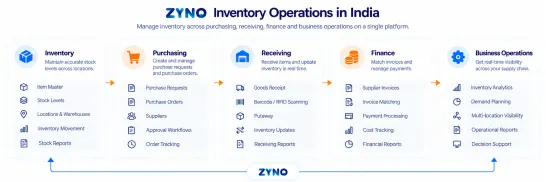
Manage inventory across locations through centralized inventory visibility.
Connect inventory requirements with purchasing and supplier processes.
Connect relevant inventory information with financial workflows.
Bring inventory and related operational workflows together in one environment.
Retail businesses need to know not only how much inventory exists, but also where it is, what is moving, what needs replenishment and what stock requires attention.
ZYNO combines inventory visibility, forecasting, replenishment and multi-location control to support retail inventory operations.
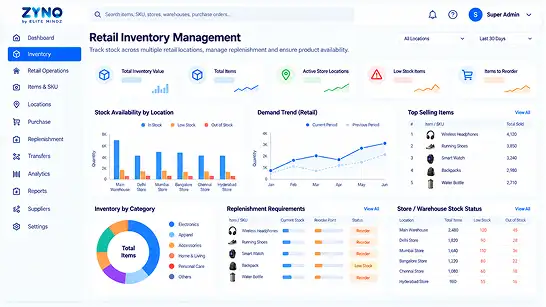
Maintain visibility across multiple stores, warehouses and inventory locations.
Use demand patterns and seasonality to support future inventory planning.
Connect inventory requirements with replenishment and purchasing workflows.
Use AI-powered forecasting and inventory intelligence to support retail inventory decisions.
Selling through multiple channels can make inventory accuracy more difficult when different channels maintain separate stock information.
ZYNO can connect supported sales-channel workflows with inventory management so teams can maintain a more consistent view of inventory availability.
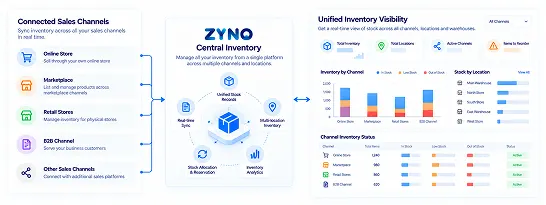
Connect supported ecommerce operations with inventory visibility.
Support inventory workflows across connected marketplace operations where applicable.
Maintain a more consistent view of inventory across supported sales channels.
Give teams a connected view of inventory information across relevant operations.
Enterprise inventory management requires more than a stock counter.
Organizations managing larger inventories may need to coordinate multiple locations, suppliers, teams, purchasing workflows and business systems.
ZYNO brings these inventory processes together in a connected environment.
Give teams a shared view of inventory across locations.
Give relevant users access to inventory information and workflows according to their responsibilities.
Use AI-powered forecasting and inventory intelligence to support inventory planning.
Connect demand, stock and replenishment signals to support better inventory decision-making.
Plan future inventory requirements using demand, seasonality and supplier lead-time information.
Connect inventory with procurement, finance and other relevant business processes.
Cloud inventory management gives teams centralized access to inventory information without relying on locally maintained spreadsheets or isolated inventory systems.
ZYNO provides a connected cloud environment for inventory information across teams and locations.
Keep inventory information in one connected environment.
Give relevant teams access to the inventory information required for their workflows.
Keep inventory information connected as stock activity changes.
Bring inventory, procurement and other supported business workflows together.
ZYNO helps you manage the complete inventory lifecycle, from tracking daily stock movements to forecasting future needs, triggering replenishment and keeping inventory information connected across your business.
Real-time inventory tracking records inventory movements across relevant locations and workflows.
Inventory forecasting analyzes demand patterns and inventory signals to identify future requirements.
Automated replenishment workflows help trigger purchasing actions when configured inventory conditions require attention.
Inventory information remains connected with procurement, receiving, finance and operational workflows.
ZYNO brings inventory, procurement and key business workflows together to support more connected, efficient and scalable operations.
ZYNO connects inventory activity with procurement workflows instead of treating inventory as an isolated process.
AI-powered forecasting, demand analysis and replenishment workflows help teams move from reactive stock monitoring toward more informed inventory decisions.
Manage inventory across multiple locations through a centralized inventory environment.
Monitor inventory movements and stock positions through connected inventory workflows.
Support scan-based inventory workflows across relevant receiving, picking and putaway activities.
Maintain visibility into relevant batch, lot and inventory movement information.
Connect configured reorder conditions with replenishment and purchase-order workflows.
Give teams centralized access to inventory information through a connected cloud environment.
Connect inventory with procurement, finance and other supported business workflows.
See how organizations have used ZYNO and related Elite Mindz solutions to manage inventory, goods receiving, stock records and connected operational requirements.
Hockey India used ZYNO to bring goods receiving and related inventory activities into a more connected digital workflow.
EaseMyTrip’s operational environment included receiving activities, asset management and related inventory processes.
PVR implemented an Electronic Register for purchase orders, GRNs, RFP tools, tender management and approvals, supporting connected inventory and receiving processes.
When evaluating inventory management software, look beyond basic stock counting.
The right inventory management system should fit the way your organization purchases, stores, moves, forecasts and replenishes inventory.
Look for current stock visibility, inventory movement tracking and multi-location control.
Check whether the platform can provide visibility across warehouses and support inventory transfers.
Look for demand forecasting, reorder intelligence, supplier lead-time awareness and automated replenishment.
Evaluate whether scan-based inventory workflows are supported where your warehouse requires them.
Check whether the system supports the level of batch, lot and other inventory traceability your operations require.
Evaluate whether AI is connected to practical inventory decisions such as forecasting, replenishment and anomaly detection.
Check whether inventory connects with procurement, finance and other relevant business workflows.
Look for inventory movement, ageing, replenishment and slow-moving inventory visibility.
Consider whether teams across locations can access a centralized inventory environment.
Evaluate whether the platform can support your operation as the number of warehouses, suppliers, SKUs and users grows.
Inventory management software is a system that helps businesses track stock levels, locations, movements, replenishment requirements and inventory-related information. It can also connect inventory with procurement, finance, warehouse and other business workflows.
Stock management generally focuses on monitoring quantities and movements of goods, while inventory management covers the broader process of tracking, controlling, forecasting, replenishing and analyzing inventory. In practice, the terms are often used interchangeably.
Inventory management software focuses on tracking, controlling, forecasting and replenishing stock across locations. A warehouse management system (WMS) focuses more specifically on warehouse execution activities such as receiving, putaway, picking, packing, bin management and warehouse movement. Some platforms connect inventory management with warehouse workflows to provide broader operational visibility.
Important capabilities can include real-time inventory tracking, multi-warehouse management, demand forecasting, automated replenishment, barcode and RFID tracking, batch and lot tracking, inventory analytics, cloud access and integration with procurement and other business systems.
Inventory management software can reduce stockout risk by monitoring inventory levels, analyzing demand, identifying replenishment requirements and triggering configured reorder workflows. Forecasting can help teams anticipate future demand instead of waiting until inventory becomes critically low.
AI inventory management software uses inventory and demand data to identify patterns, forecast future requirements and support replenishment decisions. It can connect forecasting and inventory intelligence with practical purchasing workflows.
AI inventory management software analyzes inventory and demand signals such as historical demand, seasonality, supplier lead times and stock conditions to support future inventory planning and replenishment decisions.
ZYNO Inventory Management Software uses AI-powered inventory capabilities to support demand forecasting, inventory planning and replenishment workflows.
ZYNO provides AI-powered inventory management for businesses managing multiple locations, suppliers and SKUs, combining inventory tracking, demand forecasting, replenishment intelligence, multi-warehouse visibility and procurement connectivity in one platform.
Yes. ZYNO supports multi-warehouse inventory management, providing centralized visibility across locations and visibility into relevant stock transfers and in-transit inventory.
ZYNO supports relevant barcode and RFID-enabled inventory workflows for activities such as receiving, picking and putaway.
Yes. ZYNO supports batch and lot tracking to provide greater inventory traceability across relevant inventory processes.
ZYNO supports automated inventory replenishment workflows that can identify configured reorder conditions and connect replenishment requirements with purchasing actions.
ZYNO's replenishment workflows can connect inventory requirements with purchase-order processes when configured inventory conditions require purchasing action.
ZYNO incorporates supplier lead-time information into inventory forecasting and replenishment workflows to help teams account for the time required to receive stock.
Inventory management software can use inventory activity and anomaly-detection capabilities to identify unusual movement that may require investigation.
ZYNO uses inventory and demand information to help identify slow-moving or excess inventory and support more informed purchasing and replenishment decisions.
ZYNO is positioned for businesses ranging from smaller teams to larger multi-location operations, allowing organizations to use connected inventory management as their operational requirements grow.
Yes. ZYNO provides a cloud-based environment for centralized access to inventory information across relevant teams and locations.
ZYNO connects inventory with relevant ERP, procurement, finance and business workflows through its broader platform environment.
Yes. ZYNO connects inventory requirements with purchasing workflows, including purchase requests, approvals, purchase orders, receiving and the broader procure-to-pay process.
ZYNO is designed to connect inventory, purchasing, receiving and related business workflows for organizations operating across locations in India. Specific finance, tax and compliance workflows should be confirmed based on the configured implementation.
ZYNO Procurement · Inventory Management
Stop managing inventory through disconnected spreadsheets and reactive purchasing.
ZYNO brings together real-time inventory tracking, multi-warehouse visibility, inventory forecasting, AI-powered inventory intelligence, automated replenishment, inventory traceability, analytics and connected procurement workflows in one environment.
Connect inventory requirements with structured purchasing requests and approval workflows.
Explore Purchase Requests →Connect purchasing requirements with supplier quotation workflows.
Explore Quotation Management →Centralize supplier information and connect vendor workflows with purchasing activity.
Explore Vendor Management →Connect purchasing, receiving, invoice processing and payment through one procurement workflow.
Explore Procure to Pay →Connect receiving information with purchase orders and inventory updates.
Explore Goods Receipt →Connect invoice processing with purchasing and receiving information.
Explore Accounts Payable →Connect procurement information with centralized spend visibility and analytics.
Explore Spend Analytics →Connect inventory requirements with the broader procurement lifecycle from request through payment.
Explore ZYNO Procurement →
ZYNO Digital fuels smarter digital growth through data-driven marketing, creative storytelling, and performance strategies that boost visibility, engagement, and measurable business outcomes across global platforms.

ZYNO Tech delivers cutting-edge IT solutions — including web, mobile, and digital transformation services — helping businesses scale efficiently, innovate faster, and stay ahead in a connected world.

ZYNO AI harnesses the power of artificial intelligence to automate processes, enhance decision-making, and deliver predictive insights — driving innovation, agility, and measurable business growth.

ZYNO by Elite Mindz offers AI-powered products and services that unify operations, boost productivity, and drive digital transformation — helping businesses scale smarter and innovate faster.
* In just 2 mins you'll get a response
* Your idea is 100% protected by our Non-Disclosure Agreement
With 15+ years of expertise, 300+ professional developers, and trusted by 1000+ businesses ZYNO Procurement offers top-notch procurement app to enhance your business’s productivity and security.





Complete the form and discuss procurement strategies with our experts.